Road quality
A special function next to navigation: the bike computer measures how rough the road is and records it along the ride. The data comes from a BMI160 accelerometer (IMU) inside the case, read at 400 Hz. It is optional -- without the sensor everything else works.
What it is for: seeing afterwards where a route was smooth and where it was not, finding the worst spots (potholes, kerbs), and in the long run collecting surface data over many rides.
What is measured
- Roughness class 1 to 5 per interval (2 s by default): 1 = smooth, 5 = very rough. It is the vertical vibration between 2 and 80 Hz, scaled by the speed, relative to a baseline for smooth asphalt. Below 6 km/h nothing is rated.
- Shocks: single hard hits (3 g by default), with their strength. A second peak shortly after is recognised as the rear wheel hitting the same edge.
- Gradient from the accelerometer as an alternative to the barometer. It reacts
within about a second. Off by default (
rq gradsrc imuswitches it on); the display uses the barometer.
On the display the class is the colour of the thin line at the bottom of every screen: blue = smooth to red = very rough, brass = not rated at the moment.
Calibration
Both are on the settings screen, page "IMU":
- Calibrate (bike standing still, upright): stores the mounting position of the sensor.
- Reference ride: 60 s on smooth asphalt at 12 km/h or more. It sets the baseline that "smooth" is measured against. It depends on bike and tyre pressure, so repeat it after changing either. Without it a default applies and the classes are only a rough guide.
Road labels: marking the surface by hand
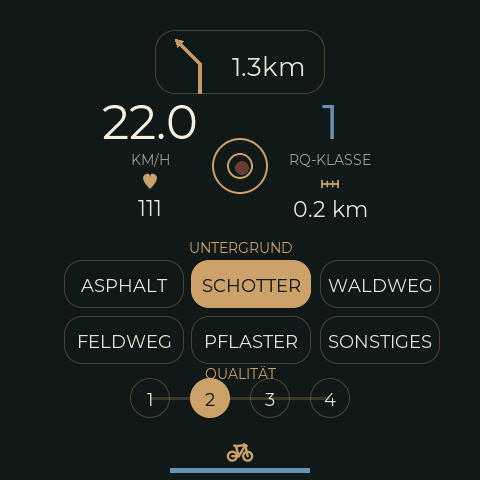
A screen of its own for collecting comparison data: you mark the surface (asphalt, gravel, forest track, field track, cobbles, other) and your own rating from 1 to 4 while riding. The labels are logged next to the automatic class, so the two can be compared afterwards and the thresholds tuned. A tap on the driving-state icon at the bottom of any screen opens it; the same tap leads back.
The round button in the middle starts a raw recording of the accelerometer (all samples, about 150 KB per minute) for a section you want to analyse closely.
What is still awkward about this screen on a rough road is listed in the usability backlog.
What ends up in the log
- per interval: class, roughness, vibration values, speed, distance
- every shock, with position and strength, plus a short raw snippet around it
- every change of the manual label
- raw recordings on demand
The tools turn this into CSV and GPX: every track point carries class and
roughness, shocks and label changes become waypoints. bikelog raw replay runs recorded
raw data through the firmware's own algorithm with changed parameters, which is how the
thresholds are meant to be tuned.
Settings and diagnosis
rq                      state and settings
rq interval 2           length of an interval in s (1..10)
rq shock 3              shock threshold in g
rq wheelbase 1.05       wheelbase in m (front/rear wheel pairing of shocks)
rq gradsrc baro|imu     source of the displayed gradient
rq ref start|stop       reference ride
rq raw 120 | stop       raw recording for 120 s
rq label 2,3            label by hand: surface 2 (gravel), quality 3
Without USB: the page /debug/imu shows state, calibration, the last intervals and
shocks and the error counters of the sensor.
State
The thresholds (class limits, shock threshold, default baseline) are first guesses from literature and a host test and have not been tuned on recorded rides yet. See the roadmap.
For developers: the algorithm is src/RoadQuality.* (pure, host test
test/native_roadquality/), the integration src/I2CSensors.cpp; the record layouts are
in src/LogRecords.h
and src/RawCapture.h.