WiFi
The bike computer joins known networks by itself, can open a hotspot of its own, and is set up either on its display or on a web page. No network name or password is compiled into the firmware.
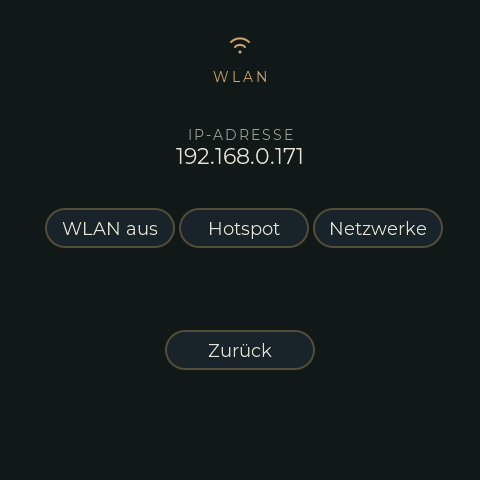
Settings screen (WLAN page)
Settings → WLAN:
| Button | Does |
|---|---|
| WLAN an / aus | Switches WiFi on (autoconnect, see below) or off. It is the only way back on after WiFi has switched itself off. |
| Hotspot / Hotspot aus | Starts or stops the hotspot (default name TRGB-BC). The hotspot password replaces the IP address on the screen while it runs. |
| Netzwerke | Opens the WiFi screen: scan, pick a network, type its password. |
The line above the buttons shows the IP address, or why WiFi is off ("kein WLAN gefunden", "Verbindung verloren", "kein Netz gespeichert", ...).
Setting up a network on the display
- Settings → WLAN → Netzwerke → Suchen. The networks in range are listed, strongest first; those already saved are brass-coloured. A scan switches WiFi on if it was off.
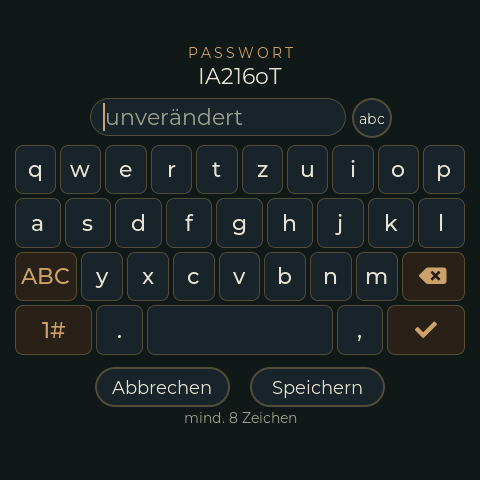
- Tap a network. The password screen opens: type the password on the keyboard (abc shows or hides it, 1# and #+= are the symbol pages, shift is one-shot). A saved network keeps its old password if the field stays empty. WPA2 needs 8 to 63 characters.
- Speichern stores it in the NVS and, if WiFi is off, connects.
The order of the saved networks (their priority) and deleting one are only possible on the web page.
Web page /wifi
Linked from the start page ("WiFi Settings"). It shows
- the state (connected to ..., hotspot, ...),
- the saved networks with ▲ ▼ (priority), Edit (password) and Delete,
- a scan with a list to pick from, or a manual SSID (also for hidden networks and open ones),
- the hotspot's name and a new password.
Up to 8 networks are stored. Passwords are never sent back to the page or written to the log; they are in the NVS as plain text, like in any ESP32 firmware without flash encryption.
Autoconnect and the 5 minutes
After boot, and whenever WiFi is switched on, the device scans and tries the saved networks that are in range in the order of the list, 15 s each (hidden ones are tried without being seen). If none works it scans again every 15 s. If there is no connection for 5 minutes (never connected, or connection lost), WiFi switches itself off to save power. A scan takes about 10 s while BLE is running.
The hotspot follows the same rule: it stops 5 minutes after the last client has left (or after start, if nobody joined).
With no network saved, WiFi stays off after boot.
Hotspot
SSID TRGB-BC unless changed, WPA2. The password is generated at the first start (10
characters) and shown on the settings screen while the hotspot runs; the web page can set a
new one. Address 192.168.4.1 (and TRGB-BC.local). Up to 4 clients.
The hotspot is a captive portal: it answers every name with its own address and redirects
every unknown URL to /wifi. Android and iOS then open the page by themselves and use the
hotspot for it even though it has no internet -- without that a phone with mobile data would
keep using mobile data and never reach 192.168.4.1.
While the hotspot runs about 14 KB less internal heap is free (see Pitfalls).
Serial console
wifi [status|on|off|ap [on|off]|scan|list|add <ssid> <password>|del <ssid>|apset <ssid> <password>],
see Debugging. Useful for a first setup without the display.
Code
| Part | File |
|---|---|
Network list, hotspot data, NVS blob, autoconnect order (host test test/native_wificonfig/) |
src/WifiConfig.* |
| State machine, scan, hotspot, CLI | src/WifiWebserver.cpp |
/wifi page and JSON interface |
src/WifiRoutes.cpp |
| Display: list, password screen, keyboard | src/ui/RimRidgeWifiCustFunc.*, EEZ pages RimRidgeWifi, RimRidgeWifiPw |
| Settings pills | src/ui/RimRidgeSettingsCustFunc.cpp |