Usability backlog: operation on the road
The device sits in its case on the handlebar. On the road there is neither USB/terminal nor reliable web access. Everything a ride needs must be operable on the device itself. This page lists what is still missing for that; the overview of all open work is the roadmap.
Already possible on the device: start, pause and end a ride (start/pause button, rides and statistics), restart and power off, IMU calibration and reference ride, switching WiFi back on and reading the IP (all on the settings screen).
1. Ride and statistics
- Average and maximum speed cannot be seen on the device. Swiping up/down on the
distance field changes the kind of average, but there is no widget for it. The values
are only on
/stat/statistics.html. - Auto-off cannot be toggled while a session is open, because the long press on the start/pause button then ends the ride. This needs a second gesture or a switch on the settings screen.
- Bike upright or on the rear carrier of a car is recorded as a ride (lift,
transport). Ideas:
- Upright or tilted: gravity deviates strongly from the calibrated orientation
g0. This can be checked directly in the ImuTask; suspend road quality meanwhile. - Transport: GPS speed above 10 km/h while the wheel stands still (no revolutions at the speed sensor).
- Upright or tilted: gravity deviates strongly from the calibrated orientation
- The real calibration has never been triggered from the settings screen (only starting and cancelling the reference ride has been tested on the device).
2. WiFi on the road
WiFi is set up on the device (settings screen → "Netzwerke": scan, pick, type the password)
or on the web page /wifi: several networks in priority order, a hotspot of its own. See
WiFi. Open:
- No network found = WiFi off after 5 min. Then only the settings screen switches it on again. On the road with the phone's hotspot that means: switch the hotspot on before boot, or press "WLAN an" afterwards.
- A scan takes about 10 s while BLE is running (the radio is shared).
- The hotspot password is only on the display. A QR code on the display would let the phone join without typing.
- Saved networks cannot be reordered or deleted on the display, only on the web page (the user's decision).
- mDNS
TRGB-BC.localis announced, but Android browsers don't resolve.localreliably. The IP is shown on the settings screen; in hotspot mode a captive portal opens the page by itself. - Alternatively: TrailBridge reports the IP or takes over settings by BLE. For that the protocol has to be agreed, and it needs the back channel from the bike computer to the app (see "Later" in the roadmap).
3. Road labels on the RQ screen
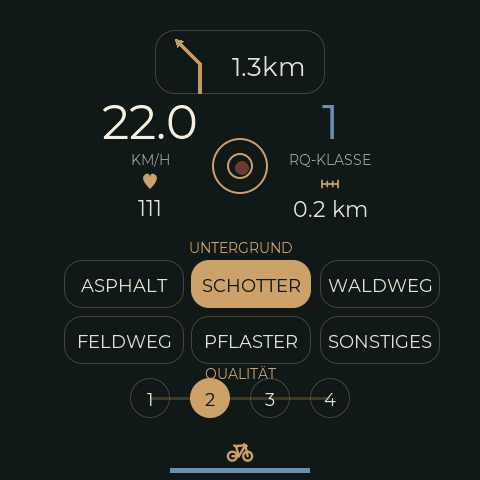
Observed on the first test ride:
- On bad roads the buttons are hard to hit. Labels therefore come late (first label 3.5 min after the start) or wrong.
- Real changes can be very short (a good cobbled section of a few seconds). A label that is changed again within 5 s counts as a mis-tap (the user's decision). By this rule there were four mis-taps, corrected after 1 to 3 s.
- Quality: on asphalt, 2 and 3 are hard to tell apart; almost everything was 2.
- Surface: the "Waldweg" (forest track) was gravelled. The category is chosen by the location (in the forest) instead of the surface.
Ideas:
- Larger touch targets, or fewer buttons at once (first surface, then quality).
- Mis-tap threshold of 5 s: a label that is replaced within 5 s does not count as a
section; the following label counts from the first tap. Either in the firmware (accept
only after 5 s without further change, backdated to the first tap; keeps the log clean)
or in the evaluation (
bikelogdiscards sections shorter than 5 s; keeps the raw data). - Backdating: a label applies from a moment a few seconds in the past (in the label
record via
prevDurationMsor a new field). - Name categories by surface: "Waldweg" → "natural ground/earth"; split gravel into "compacted/fine" and "coarse".
- Quality levels with anchor descriptions: 1 = new/smooth, 2 = good, occasional patches, 3 = many patches/cracks, 4 = broken.
- Show which label is active, also on the main screen.
4. More displays and settings on the device
- Wheel circumference and sensor pairing (today only on the web).
- Battery level of the BLE sensors (is read, not shown).
- Remaining distance and time of the navigation (are received, not shown).
- Progress during a firmware update.