Rim & Ridge — design system¶
Visual identity of the T-RGB bike computer: a round 480×480 display (GC9A01-class TFT), LVGL UI. Restrained, thin lines, one accent colour (brass) on anthracite. Named after the motif of the boot logo — the edge of the screen itself is the rim.
Status:
| Screen | File | State |
|---|---|---|
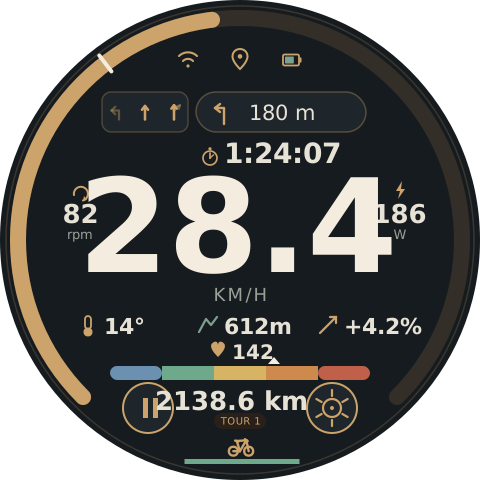
| Main screen | mainscreen.svg |
implemented, EEZStudio/TRGB-BikeComputer.eez-project, screen rim_ridge, incl. road-quality indicator (rr_line_rq, §4) |
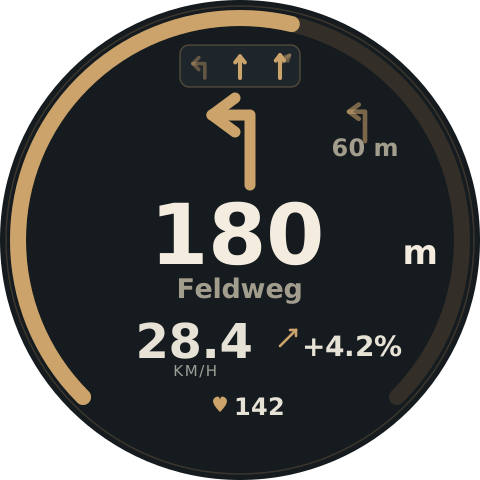
| Navigation screen | navscreen.svg |
implemented, screen rim_ridge_nav (SCREEN_ID_RIM_RIDGE_NAV) |
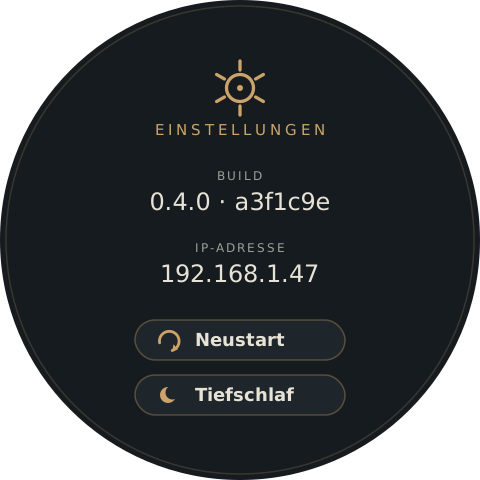
| Settings | settings.svg |
implemented, screen RimRidgeSettings (SCREEN_ID_RIM_RIDGE_SETTINGS), extended beyond the SVG by WiFi reconnect, calibration and reference ride (§6) |
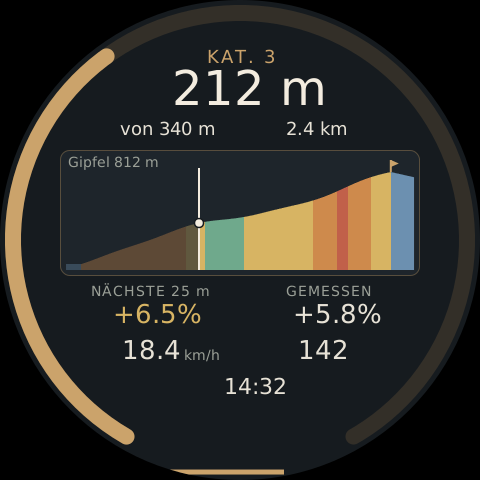
| Climb screen | climbscreen.svg |
implemented, screen RimRidgeClimb (SCREEN_ID_RIM_RIDGE_CLIMB), elevation profile coloured by gradient (§6) |
| WiFi screens | -- | implemented, screens RimRidgeWifi (list of the scan, rows built at run time) and RimRidgeWifiPw (password field + keyboard), reached from the settings screen; the settings screen's WLAN row is three pills (WLAN an/aus, Hotspot, Netzwerke), see WiFi |
| RQ ride screen | rqscreen.svg |
implemented (screen RimRidgeRQ) — nav pill, speed, heart rate, distance counter (tour distance) with real data; RQ index from ui_RimRidgeUpdateRoadQuality(); surface pills, quality selector and record button wired live through I2CSensors::setRoadLabel*()/startRoadCapture() (a tap toggles, a second tap on the active value resets it) |
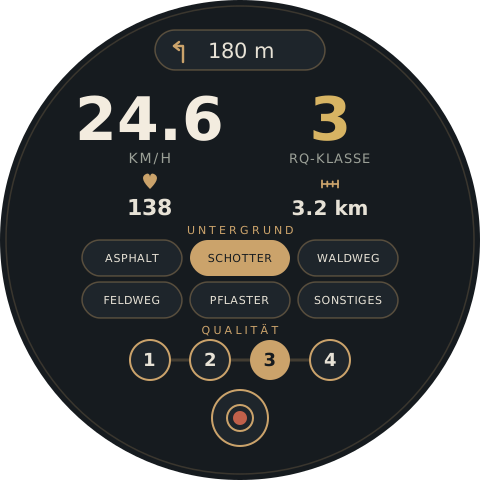
Every SVG file is 1:1 in the target coordinate system (480×480 units = 480×480 physical
pixels) and can be checked directly in the browser or with
rsvg-convert -w 480 -h 480 mainscreen.svg -o preview.png in real pixel size — on a
round 480 px display with little area this is not an optional step, see "Lesson: icon
size" below.
Where SVG and implemented screen differ, the EEZ screen counts. This document describes the current state of the design. It should be enough to build another screen in the same system without having to reinvent the whole picture.
1. Colour palette¶
All values already exist in screens.h/theme_colors[] as COLOR_ID_RR_* and are
verified (1:1 with the values below) — when building new screens reference these theme
colours, don't hex-code them anew.
Token (COLOR_ID_RR_…) |
Hex | Use |
|---|---|---|
BACKGROUND |
#161B1F |
screen background (anthracite) |
RIM_OUTLINE |
#3A362E |
outer bezel ring, r=234, 1.5 px, every screen |
ARC_TRACK |
#332F28 |
unfilled part of the speed/distance ring |
BRASS |
#CBA36B |
primary accent — lines, icons, ring fill, number highlights |
PARCHMENT_BRIGHT |
#F3ECDF |
hero value (speed number) and average marker |
PARCHMENT |
#E7E2D6 |
secondary values: distance, temperature, altitude, gradient, heart rate, button labels |
MUTED |
#9BA097 |
units, small caption labels |
SAGE |
#7FA08F |
reference to nature: altitude/gradient icon, battery level "good" |
PANEL_BG |
#1E252B |
surfaces of chips/buttons |
TOUR_BG |
#282019 |
surface of the mode chip |
ZONE_BLUE … ZONE_RED |
#6C90B0 #6FA98C #D7B463 #CE8A4C #C1604A |
heart-rate zones 1–5, the only deliberately colourful place in the system |
Street name and the smaller distance of the next-but-one hint run on #A39D8E (muted
parchment, no token of its own in EEZ — add it when needed or map to MUTED).
theme_colors[] additionally holds 16 colour IDs without the RR_ prefix
(NAV_ICON_RECOLOR, ARC_SPEED_TRACK, GRADIENT_GOOD_GREEN …) with garish placeholder
values (pure green/red/blue) — not part of this system, to be cleaned up at some point.
2. Typography¶
Three fonts, clearly separated by role — never mix by taste:
| Role | Font | Weight | Examples |
|---|---|---|---|
| Hero/secondary number | Big Shoulders Display | 700 (hero), 600 (secondary) | speed (130 px main / 48 px nav), distance to maneuver (84 px nav), distance/cadence/watts/temperature/altitude/gradient/heart-rate value (20–28 px) |
| Field/button label | IBM Plex Sans | 600 | button captions ("Neustart", "Tiefschlaf"), street name |
| Unit / technical label | IBM Plex Mono | 400–500 | units (KM/H, rpm, W), mode chip text, screen title, build/IP values |
Google Fonts
(fonts.googleapis.com/css2?family=Big+Shoulders+Display:wght@600;700&family=IBM+Plex+Sans:wght@400;600&family=IBM+Plex+Mono:wght@400;500)
for preview/browser. For LVGL export as a bitmap font through the font converter
(ui_font_by7x128 already is the 128 px variant of Big Shoulders Display for the speed
value) — one bitmap font per combination of font+weight+size actually used, LVGL cannot
scale fonts at run time.
Lesson: icon size¶
Pictogram icons (bicycle, stop sign etc.) need an edge length of at least 32–34 px.
At 20 px details like the spoke holes of a wheel blur practically completely — tested
both anti-aliased and as simulated 1-bit rendering (the hardest case: no alpha blending).
The ride-state icons already exported (ui_image_rr_icon_state_*.c) use 34×34 px with
LV_IMG_CF_ALPHA_8BIT — that is the right reference size and the right format
(anti-aliased alpha channel, tinted to RR_BRASS at run time by
lv_obj_set_style_img_recolor instead of baking the colour into the bitmap). Export new
icons following the same pattern, not as LV_IMG_CF_INDEXED_1BIT like the older
SquareLine assets (removed 2026-09-27).
3. Coordinate system¶
480×480, centre (240, 240). No layout grid — the circular shape determines how much
horizontal space is available at a given height:
half width(dy) = √(r_safe² − dy²) r_safe ≈ 205
dy = vertical distance from 240. At dy = 0 (middle of the screen) ±205 px are
available; at dy = 148 (height of the nav pill/status line) only ±141 px. That is why
wide elements (heart-rate zone bar, speed number) sit at centre height and narrow, short
content (status line, buttons) at the top/bottom. Before every new element, briefly do
the sum at its Y height, don't place by feel — that was the most frequent source of
errors while this design came into being.
r_safe ≈ 205 results from the arc ring at r=222 with a thickness of 16 px (inner edge
≈ 214) minus a safety margin. The bezel ring at r=234 is purely decorative and claims
no content space.
4. Reusable components¶
Gapped arc (speed/distance ring)¶
A pattern suitable for lv_arc: two concentric circles (track + fill), 270° arc with a
fixed 90° gap at the bottom, zero point fixed at the bottom left.
r = 222, stroke width = 16
circumference C = 2·π·r ≈ 1394.87
track dasharray = "1046.15 348.72"           (0.75·C / 0.25·C)
fill dasharray  = "{0.75·C·value/max} {C−…}"  e.g. 55 % → "575.38 819.49"
both: transform="rotate(135 240 240)"
The meaning depends on the screen: on the main screen the ring fills with the speed
(0 = empty, max = full ring). On the navigation screen the same mechanism shows the
distance to the maneuver (fills as you approach). Average marker: a <line> across the
ring at r ± 10, angle 225° + 270°·(average/max) clockwise from 12 o'clock — helper
formula in polar coordinates for that:
x = cx + r·sin(θ) y = cy − r·cos(θ) (θ in degrees, 0° = top, clockwise)
Heart-rate zone band¶
Five 52×14 rectangles side by side (the outer ones rounded with rx=7), fixed zone
colours (§1), plus a small triangle as a position marker above the segment that
corresponds to the current value. Deliberately the only place with more than two colours
at once — here colour carries a real function.
Pill / chip¶
rx = height/2 (full pill), surface PANEL_BG (nav chip) or TOUR_BG (mode chip),
border BRASS at 30–40 % opacity, 1.5 px. For containers with several elements (lane
display) rx≈9 instead of a full pill — distinguishes "container" from "switch/hint"
visually.
Icon buttons (round) vs. buttons with label (pill)¶
Main screen buttons (pause, settings) are pure icon circles, r=25, surface PANEL_BG,
border BRASS 2 px — enough context from the position, no text needed. The settings
screen uses wider pills (210×40, rx=20) with icon and label, because
"Neustart"/"Tiefschlaf" (restart/deep sleep) would not be unambiguous enough without
text, and there is clearly more room here than in the crowded foot of the main screen.
Segmented selector (discrete levels)¶
For a small, fixed number of levels (e.g. quality 1–4) instead of a continuous
lv_slider: n circles (r=20, surface PANEL_BG, border BRASS 2 px) at a fixed
distance of 60px side by side, connected by a thin line (BRASS 25 % opacity,
stroke-width=3) as a visual bracket. Selected level: circle fully BRASS, digit in
BACKGROUND (dark on light instead of light on dark) instead of a border — the same
selection contrast as with the filled mode chip at the bottom. r=20 is deliberately of
the same order as the round icon buttons (r=25, §4) — large targets, operable with one
hand. First use: RQ ride screen (§6).
Stat group (icon + value + unit)¶
Recurring pattern for cadence/watts/temperature/altitude/gradient: a small line icon
(stroke-width 1.6–2.2, BRASS), the value directly below or beside it in Big Shoulders
Display 600, the unit small in IBM Plex Mono, MUTED. With two symmetric groups
(cadence/watts) place them as a narrow column outside the speed number, not beside it at
the same height — otherwise there is a risk of collision with the large number (see §3).
Ride time / time of day¶
One slot, two possible contents — which one applies is application logic, not part of this specification. Icon and value always change together:
- Ride time (stopwatch icon: circle + crown on top + hands) — elapsed time of the
current ride/tour, format
H:MM:SSorMM:SS - Time of day (plain clock-face icon: circle + two hands, no crown) — current time,
format
HH:MM
Sits between nav pill/lane display (y≈132) and the speed number (digits start at ≈y177).
Icon fixed at x=210, value left-aligned from x=224 (not centred as a group), so that
the different character width of 1:24:07 compared with 14:32 does not have to be
re-centred at every change — the same technique as with the nav chip icon+text. Big
Shoulders Display 600, 28 px, PARCHMENT — like all other values on the screen, no
special treatment.
Lane display (lane widget)¶
One common frame (rx≈9, PANEL_BG, BRASS outline at 30–45 % opacity) around all lane
arrows — no frame per arrow, that only costs space without benefit. One arrow per
real lane:
- unambiguous direction → simple arrow,
BRASSfull (recommended) or 40–45 % opacity (not your lane) - several directions in one lane → one arrow with a common shaft that splits into branches (not two separate arrow icons side by side — collides at small tile sizes). Only the branch that corresponds to the actual route in full opacity.
Conditional: only visible when OsmAnd delivers lane data. On the main screen it sits to
the left of the nav pill, which moves 46 px to the right for it (animated, ~600 ms, with
rest phases at both ends — no abrupt jumping). Without lane data the nav pill stays at
its centred base position (x=150).
Driving-state icon¶
Four states, all related to the bicycle (not abstract — a single wheel alone does not read reliably as "bicycle" at 34 px):
| State | Motif | Idea |
|---|---|---|
| Riding | bicycle (2 wheels + frame) | basic state |
| Cruise | the same bicycle, smaller + magnifying glass at the top right | deliberately slow, looking for something (sightseeing, ice-cream parlour, fountain) instead of riding |
| Stop | stop sign (octagon) | short, involuntary halt (traffic light) |
| Break | cup | longer rest of one's own choosing |
EEZ assets already exist: img_rr_icon_state_power (riding),
img_rr_icon_state_coasting (cruise), img_rr_icon_state_stop,
img_rr_icon_state_break (break) — 34×34, ALPHA_8BIT. Path reference for the basic
bicycle motif (construction, in case an icon has to be rebuilt):
wheels:  circle r=3.2 at (-5.5, 3) and (5.5, 3)
frame:   M-5.5,3 L-0.8,3  M-0.8,3 L-3,-4.3  M-0.8,3 L3.8,-4.8
         M3.8,-4.8 L5.5,3  M-3,-4.3 L3.8,-4.8
saddle/handlebar caps: M-4.2,-4.6 L-1.8,-4   M2.8,-5.6 L4.8,-4.2
Road-quality indicator¶
Implemented as rr_line_rq, a single LVGLLineWidget. No icon, no caption — the
colour is the information, deliberately minimal ("only the quality class as a small
coloured indicator", based on the BMI160).
- Sits in the container
rr_group_rq_modedirectly below the driving-state icon (align=BOTTOM_MID, widget140×5, line0,0 → 115,0,line_width=5) — a thin bar just above the edge of the screen. - Class
n(1–5) →line_colorset to the corresponding one of the five heart-rate zone colours (§1,ZONE_BLUE…ZONE_RED,theme_colors[26..30]) — smooth = blue, very rough = red, the same order as the heart-rate bar. - Class 0 (no data yet or too slow/standstill) → the widget stays visible,
line_colorset toRRBrass(the same brass tone as the rest of the UI) instead of one of the five zone colours — deliberately no showing/hiding at every traffic-light stop, the line is present throughout, only the colour carries the information. Identical to the JSON default in EEZ Studio, before the first real class. - Identical on all five screens:
rr_group_rq_mode(containerBOTTOM_MID, offset(0,-5),197×40, in it the driving-state iconTOP_MIDandrr_line_rqBOTTOM_MID) is copied 1:1 asrq_group_rq_mode(RQ ride),rrnav_group_rq_mode(navigation),rrset_group_rq_mode(settings) andrrclimb_group_rq_mode(climb screen). Icon and line colour are set byui_RimRidgeUpdateStateIcon()/ui_RimRidgeUpdateRoadQuality()on all copies. A tap on the group opens the RQ ride screen; on the RQ ride screen itself it leads back to the main screen (actionGoToRq). Always make changes to the group the same on all five screens. - Wired in
ui_RimRidgeUpdateRoadQuality()(src/ui/RimRidgeCustFunc.cpp) — data chainRoadQuality/I2CSensors→Statistics::updateRoadQualityUi()→UIFacade::updateRoadQuality().
5. Icon library¶
| Icon | EEZ asset | Construction |
|---|---|---|
| WiFi | img_rr_icon_wifi |
dot + two concentric open arcs |
| GPS | img_rr_icon_gps |
pin outline (Bézier) + circle |
| Battery | img_rr_icon_battery |
rectangle + terminal nub, level rectangle inside (SAGE = good) |
| Nav turn arrow | img_rr_icon_turn |
angled line + arrowhead, 64×64 (larger, as it is the hero element on the nav screen) |
| Cadence | img_rr_icon_cadence |
open circular arc + arrowhead (rotating movement) |
| Watts | img_rr_icon_power |
lightning polygon |
| Temperature | img_rr_icon_temp |
thermometer (rectangle + circle bulb) |
| Altitude | img_rr_icon_height |
mountain silhouette (polyline) — picks up the ridge motif of the boot logo, SAGE |
| Gradient | img_rr_icon_gradient |
diagonal line + angled arrowhead |
| Heart rate | img_rr_icon_heart |
composed Bézier heart shape |
| Pause (button) | img_rr_icon_pause |
two vertical bars |
| Settings (button) | — (no rr_icon_ asset of its own yet, see below) |
circle + hub + 6 radial teeth, 60° apart |
| Driving state ×4 | img_rr_icon_state_{power,coasting,stop,break} |
see §4 |
| Restart (settings) | img_rr_icon_cadence (reused) |
cadence icon (circular arc + arrowhead) as "rotating/reset" |
| Deep sleep (settings) | img_rr_icon_moon |
full circle r=8 minus an offset circle r=7 at (4.5,−2.5) ("punched-out" crescent), ALPHA_8BIT |
| Stopwatch (ride time) | img_rr_icon_stopwatch |
circle + small crown/button on top + two hands — see §4 "Ride time / time of day" |
| Clock (time of day) | img_rr_icon_clock |
like the stopwatch but without the crown — shares the same widget slot with the stopwatch icon |
| Distance counter (RQ ride) | not exported yet | ruler motif: horizontal line + four vertical ticks (deliberately abstract like the cadence/gradient icon, not literally "odometer") |
| Record button (RQ ride) | not exported yet | ready state: circle + ring + small red dot (camera/record language); recording state (not drawn as an image, only described): circle fully red + bright stop square, thicker red border instead of BRASS. Red = ZONE_RED/#C1604A, the same second use as for the log level badges in the web dashboard (--rr-err) |
img_settings_icon already exists (48×48, TRUE_COLOR_ALPHA — a different format from
the rest, full colour instead of an alpha mask), the icon of the settings button on the
main screen. Before reusing it in EEZ Studio, check whether the export is clean (a test
decode gave stripes in the upper part); the gear construction above is the replacement if
needed.
6. Screens¶
Main screen — mainscreen.svg¶
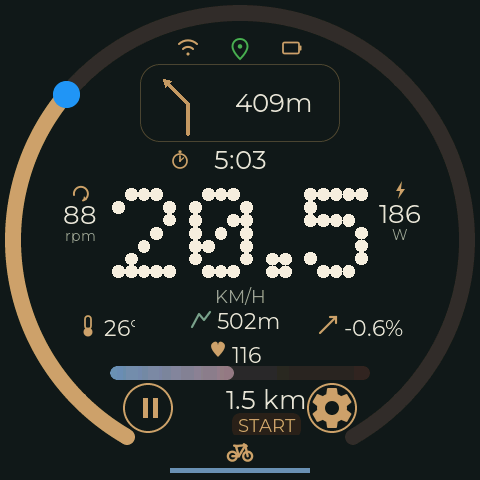
Order from the inside out: speed (centre, 130 px, dominant) → cadence/watts (flanking,
narrow columns at x=80/400) → temperature/altitude/gradient (row at y≈325) → heart-rate
value + zone band (y≈353–380) → foot (pause button on the left, settings button on the
right, between them a common column rr_tour_pill at x173–307/y378–480: distance → mode
chip → driving-state icon 34 px → road-quality indicator, all four stacked vertically
instead of side by side — see §4 "Road-quality indicator" for the reasoning) → outside
the speed arc with average marker → at the top the status line (WiFi/GPS/battery) and
the nav pill, to its left conditionally the lane display, below it ride time/time of day
(y≈157, see §4) in the gap between nav pill and speed number.
Navigation screen — navscreen.svg¶
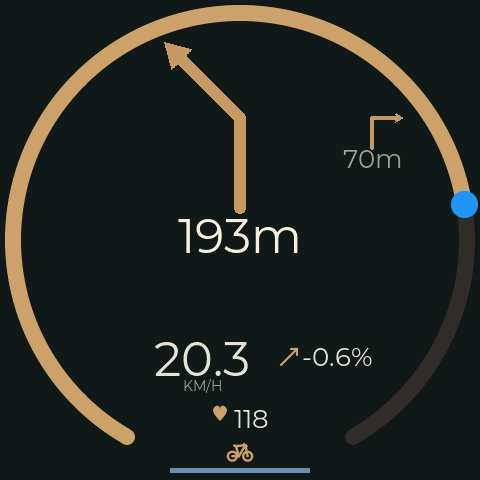
Appears automatically as a full screen when a navigation instruction is due, and disappears again afterwards (back to the main screen). Manually: a tap on the nav pill opens it, a swipe to the right closes it.
Structure: distance ring (same mechanism as the speed arc, see §4) → large turn icon +
distance (number in two sizes: 84px value + 34px unit as a tspan, so that the unit
does not look as large as the number) → street name below, muted → next-but-one hint as
a small badge at the top right, deliberately outside the main reading lane → speed +
gradient as a medium-sized pair → heart rate at the very bottom, here only colour +
number, no zone band (secondary on this screen). Lane display at the top, the same widget
as on the main screen, here at full size (scale 1.2 instead of 0.75, more room
available).
Deliberately without the ride time/time of day widget: the screen is tightly focused on the upcoming turn, and for the ambient information "how long have I been riding" the briefly shown nav screen is the wrong place — that belongs on the main screen, where it is visible throughout.
Settings — settings.svg¶
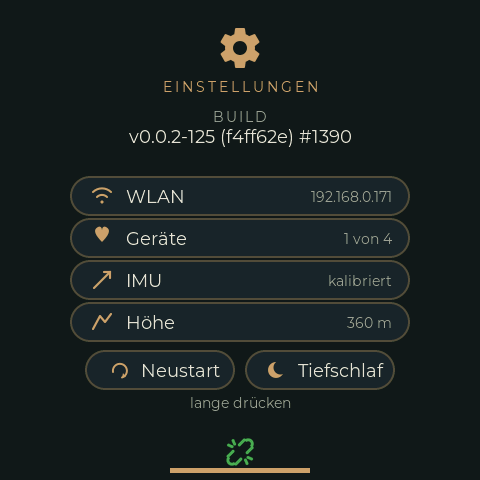
Implemented as RimRidgeSettings. Compared with the SVG study (gear, title, build,
IP, restart, deep sleep), WiFi reconnect, IMU calibration and reference ride were added
so that they can be operated on the road without the web
(usability backlog). Restart and deep sleep therefore stand side
by side instead of one below the other. No status-line header, but at the bottom the
common driving-state/RQ group (§4). Open: tap on rr_btn_settings; back: swipe in any
direction. Logic: src/ui/RimRidgeSettingsCustFunc.cpp.
| Element | Box (x, y, w, h) | Font/colour | Content |
|---|---|---|---|
rrset_ic_gear |
216, 24, 48, 48 | SettingsIcon, BRASS |
|
rrset_title |
TOP_MID, y=78 | 14, spacing 3, BRASS |
"EINSTELLUNGEN" |
rrset_build_caption / _val |
TOP_MID, y=108 / 126 | 14 MUTED / 18 PARCHMENT |
v0.0.2-88 (51c4300) #1277 = tag-commits (hash) #build number |
rrset_ip_caption / _val |
TOP_MID, y=156 / 174 | 14 MUTED / 22 PARCHMENT |
IP, "… (AP)", or "WLAN aus" / "verbinde ..." / "Verbindung verloren" / "kein WLAN gefunden" |
rrset_btn_wifi |
135, 208, 210, 40 | pill, 18 | "WLAN verbinden"; DISABLED ("verbinde ...", "WLAN verbunden") as long as not offline |
rrset_btn_cal / rrset_btn_ref |
50/245, 258, 185, 40 | pill, 18 | "Kalibrieren" / "Referenzfahrt" (running: "Abbrechen") |
rrset_cal_status / rrset_ref_status |
50/245, 302, 185, 2 lines | 14, MUTED; running PARCHMENT, error ZONE_RED |
"kalibriert 25.09.", "still halten ... 67 %", "Fehler: bewegt" / "Standard (150 mg)", "23 / 60 s ab 12 km/h", "142 mg 27.09." |
rrset_btn_reset / rrset_btn_sleep |
85/245, 346, 150, 40 | pill with icon + 18 | long press |
rrset_hint |
TOP_MID, y=392 | 14 MUTED |
"lange drücken" → "loslassen: Neustart" |
Pills: PANEL_BG fully opaque, border BRASS 2 px at border_opa 90, PRESSED: border
full + surface TOUR_BG, DISABLED: border border_opa 40, text MUTED.
Decided points:
- Restart/deep sleep are triggered by a long press and only executed after release: deep sleep wakes through the touch interrupt, a finger still resting on the screen would wake it again at once. Before that, distance (NVS) and log files are saved.
- Calibration and reference ride start with a simple tap. Both only overwrite something on success; the reference ride can be cancelled with the same button.
- The WiFi button only reconnects when WiFi is off (it switches itself off after 100 s without a connection or after losing the connection). AP mode and several access points are still open.
- No brightness control (decision: the dark design is not too bright at night either; possibly a higher-contrast daytime design later).
Climb screen — climbscreen.svg¶
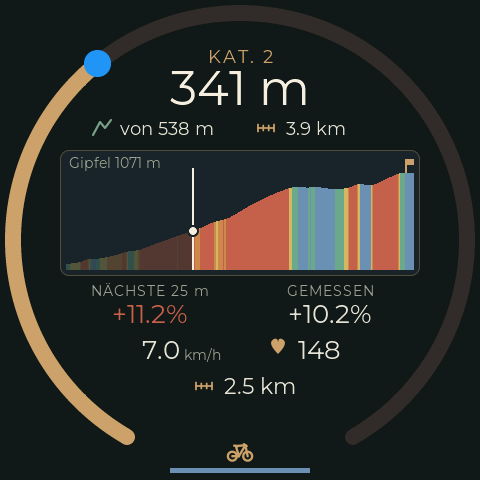
Implemented as RimRidgeClimb. Shows the climb from TrailBridge's elevation profile;
detection, categories and settings are described under climbs. Appears by
itself at rated climbs and disappears afterwards. Manually: a tap on altitude or gradient
on the main screen (action GoToClimb), a swipe in any direction closes it. Logic:
src/ui/RimRidgeClimbCustFunc.cpp.
The order follows what one wants to know on a climb: how much is left (hero), how steep it gets next (profile, gradient ahead in its colour), only then speed and heart rate. No status-line header, at the bottom the common driving-state/RQ group.
| Element | Box (x, y, w, h) | Font/colour | Content |
|---|---|---|---|
rrclimb_arc |
5, 5, 470, 470 | gapped arc (§4) | share of the altitude gain already done |
rrclimb_cat |
TOP_MID, y=46 | 18, spacing 2, BRASS |
"KAT. 3", "KAT. HC", "ANSTIEG" (not rated), "KEIN ANSTIEG" |
rrclimb_rem_val |
TOP_MID, y=62 | 48, PARCHMENT_BRIGHT |
altitude gain to the summit, "212 m" |
rrclimb_grp_total |
86, 112, 150, 32 | altitude icon SAGE + 18 |
altitude gain of the whole climb, "von 340 m" |
rrclimb_grp_dist |
250, 112, 144, 32 | ruler icon + 18 | distance to the summit, "2.4 km" |
rrclimb_profile |
60, 150, 360, 126 | PANEL_BG, border BRASS 1 px, rx=9 |
profile, drawn in C (below) |
rrclimb_summit_alt |
in the profile, 8, 3 | 14, MUTED |
"Gipfel 812 m" / "kein Höhenprofil" |
rrclimb_grp_ahead |
70, 282, 160, 46 | 14 MUTED above 26 |
"NÄCHSTE 25 m" + average gradient ahead, in its profile colour |
rrclimb_grp_grad |
250, 282, 160, 46 | 14 MUTED above 26 PARCHMENT |
"GEMESSEN" + measured gradient |
rrclimb_grp_speed |
96, 334, 136, 32 | 26 + unit 14 MUTED |
speed, right-aligned at the unit |
rrclimb_grp_heart |
262, 334, 110, 32 | heart icon + 26 | heart rate |
rrclimb_grp_info |
188, 370, 150, 32 | icon + 22 | cycling field: time of day, distance, temperature, cadence, altitude; the icon changes along, fade-in 400 ms |
rrclimb_group_rq_mode |
BOTTOM_MID | common group (§4) |
Profile: one column per pixel, height from the linearly interpolated profile, colour
from the gradient of the 25 m section in five bands on the zone colours (§1): below 1 %
ZONE_BLUE, up to 4 % ZONE_GREEN, up to 7 % ZONE_YELLOW, up to 10 % ZONE_ORANGE,
ZONE_RED above. After the heart-rate zones and the RQ indicator the third place where
colour carries a function, with the same meaning calm → hard. The part already ridden is
at 35 % opacity, the rider is a bright vertical line with a dot on the profile, the
summit carries a small flag in BRASS. Visible is the climb from 100 m before the foot
to 150 m behind the summit; the altitude scale spans at least 20 m, so that a small hill
does not look like a pass.
Decided points:
- The hero is "still to go" with the unit in the same size ("212 m"), as one centred label. Number and unit in two sizes would need a fixed column, and the number has two to four digits.
- "von 340 m" ("of 340 m") continues the hero ("212 m of 340 m") and saves a caption.
>in front of values as long as the summit is not in the profile (no longer occurs: the phone sends the climb up to the summit).- The cycling field always shows only one value with its icon. Missing values (no cadence sensor, no temperature) are skipped.
RQ ride screen — rqscreen.svg¶
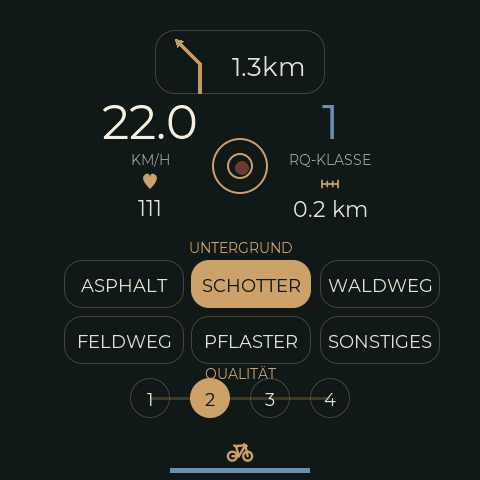
A ride screen of its own for deliberately collecting reference data on road quality:
mark surface and subjective quality by hand, while optionally a detailed recording runs —
complements the automatic classification (§4 "Road-quality indicator") with real ground
truth, e.g. for comparing against OSM tags or for sharpening the thresholds in
RQ::Config::classThr. As with the settings screen deliberately without the status
line (WiFi/GPS/battery) — the room goes to the controls at the bottom, which have
priority on this screen.
Structure from top to bottom:
| Element | y (centre/baseline) | Size/value | Note |
|---|---|---|---|
| Nav pill | 30–70 | as on the main screen | moved from y=92 to y=30 (§3 formula checked at the new height) |
| Speed | 140 (value) / 163 (unit) | 60 px, PARCHMENT_BRIGHT |
"medium-sized", on a par with the RQ index |
| RQ index | 140 (value) / 163 (caption) | 60 px, zone colour (§1) | digit 1–5 in the colour of the current class, no hiding at 0 (convention as for rr_line_rq) |
| Heart rate | 185 (icon) / 215 (value) | 22 px | heart icon reused, no zone band (too small for this screen) |
| Distance counter | 184 (icon) / 215 (value) | 20 px | new ruler icon (§5), value+unit one string like the distance on the main screen |
| Surface pills | 240–318 | 6× 100×36, rx=18 |
text pills without icon (reason: §2 lesson on the minimum icon size), 2×3 grid: Asphalt/Schotter/Waldweg/Feldweg/Pflaster/Sonstiges (asphalt/gravel/forest track/field track/cobbles/other) |
| Quality | 360 | 4× r=20 |
segmented selector (§4), levels 1–4 |
| Record button | 166 | r=28 |
in the free middle column between speed and RQ index (212,138,56,56); at the bottom sits the common driving-state/RQ group (§4) |
Why a 4-level selector instead of the automatic 5 classes: the automatic
classification (RQ::IntervalResult::roadClass, 1–5) and the subjective user rating here
are deliberately separate scales — mixing them would obscure whether a deviation is due
to perception or to the algorithm. 4 instead of 5 levels because a user rating "exactly
in the middle" is rarely selective anyway; if practice shows that 5 levels are needed for
the comparison of target and actual, a fifth circle at the same distance (60 px) can be
added without changing the pattern.
Storage and wiring: the manual label ends up as a record type of its own
(LogRec::Label, record type 3) in the binary log, additionally in every shock record
and every raw data block (see src/LogRecords.h, Tools/bikelog/record.py); the
firmware API for it is I2CSensors::setRoadLabelSurface()/setRoadLabelQuality()/
startRoadCapture()/stopRoadCapture()/getRoadLabelState(). The 6 surface pills, the
4 quality circles and the record button are wired through direct
lv_obj_add_event_cb() calls (not as EEZ actions — 11 almost identical actions for pure
logic without a screen change would have had no benefit), see
ui_RimRidgeRQInitLabelControls()/ui_RimRidgeRQUpdateLabel() in
src/ui/RimRidgeRQCustFunc.cpp. Start/stop is a simple tap (no long press) — another tap
on the active pill/the active circle resets it to "none", a tap on the record button
stops a running capture. The display always reads the state from getRoadLabelState(),
never from the tap itself, because a capture ends by itself after 30 min at the latest
and the label does not survive a restart.
7. Notes for the implementation in EEZ Studio¶
- Image icons:
LV_IMG_CF_ALPHA_8BIT, tinted toRR_BRASS(or the respective zone colour) at run time bylv_obj_set_style_img_recolor— don't bake colour into the bitmap. Minimum size 32–34 px, see §2. - Arc widgets: both rings (speed, in future distance) are standard
lv_arcwith the angles/values from §4 — no custom drawing needed. - Naming convention (derivable from the existing main screen):
rr_<element>for widgets,rr_ic_<name>for icons,rr_btn_<name>for buttons, suffix_val/_unitfor value/unit pairs,_pill/_bgfor chip surfaces. - Screens:
SCREEN_ID_RIM_RIDGE,SCREEN_ID_RIM_RIDGE_NAV,SCREEN_ID_RIM_RIDGE_RQ,SCREEN_ID_RIM_RIDGE_SETTINGS,SCREEN_ID_RIM_RIDGE_CLIMB. Widget prefixes:rr_,rrnav_,rq_,rrset_,rrclimb_. - Self-drawn content: a container in the EEZ project defines position and frame, C
draws into it in the draw event (
rrclimb_profile). The canvas then shows the empty frame. - Checking on the device: screenshot and synthetic touches with
Tools/uishot.py(see debugging, "Remote UI testing"). - Ride time/time of day widget:
rr_ic_time(icon) +rr_time_val(text) onrim_ridge. Which state applies is decided by the firmware (ui_RimRidgeUpdateTime()).